Best Free AI Text-to-Speech Tools With No Watermark (2026)

On this page6 sections
- Free AI Text-to-Speech Tools With No Watermark: Quick Comparison
- The Best Free Text-to-Speech Tools With No Watermark
- 1. ElevenLabs — Best Overall for Watermark-Free Audio
- 2. Speechify — Best for Reading Existing Text Aloud
- 3. Fish Audio — Best Budget Upgrade Path
- Tools to Avoid If a Watermark-Free Download Matters
- How to Choose the Right Tool
- Frequently Asked Questions
- Final Verdict
ElevenLabs is the best free AI text-to-speech tool with no watermark on audio downloads — you get 10,000 characters a month and clean MP3 files. Speechify is the next best pick if you just need existing text read aloud. Skip Murf AI and LOVO AI for this specific need — both confirm watermarked exports on their free tiers.
- Not every "free" AI voice generator is actually watermark-free — some tools just don't advertise it
- ElevenLabs and Speechify don't add an audible watermark to free-tier audio
- Murf AI and LOVO AI both confirm watermarked exports on their free tiers in their own help docs
- "No watermark" and "no commercial-use restriction" are two different things — most free tiers still block commercial use even without a watermark
- Fish Audio skips the audible watermark too, but its free tier is personal-use only until you upgrade
Best Free AI Text-to-Speech Tools With No Watermark (2026)
You search for the best free AI text-to-speech tools with no watermark, generate a voiceover, download the file, and there it is — a branded overlay stamped right into your audio. It's one of the most annoying surprises in content creation, and it happens more than most "best free" roundups admit.
Here's the short version: ElevenLabs and Speechify don't add an audio watermark to free-tier downloads. Murf AI and LOVO AI do. Below is a verified, tool-by-tool breakdown so you don't find out the hard way.
Free AI Text-to-Speech Tools With No Watermark: Quick Comparison
| Tool | Best For | Free Plan | Audio Watermark? | Commercial Use (Free) | Starting Paid Price |
|---|---|---|---|---|---|
| ElevenLabs | Realistic voices | 10,000 chars/mo | No | Limited | $5/mo |
| Speechify | Reading text aloud | ~600 credits/mo | No | No | $19/mo |
| Fish Audio | Budget upgrade path | Personal use | No confirmed watermark | No | $11/mo |
| Murf AI | — (avoid for this need) | Preview only | Yes, no clean download | No | $19/mo |
| LOVO AI | — (avoid for this need) | 300 words/mo | Yes, on exports | No | $24/mo |
Want the full breakdown on the top pick? Keep reading, or jump straight to what ElevenLabs offers.
The Best Free Text-to-Speech Tools With No Watermark
1. ElevenLabs — Best Overall for Watermark-Free Audio
ElevenLabs is an AI voice generator built for realistic, emotionally expressive speech across 70+ languages. It's the clearest winner here because its free-tier text-to-speech audio downloads carry no audio watermark at all.

What makes it stand out: the free plan gives you a genuine 10,000 characters a month — enough for several short scripts — and the voice quality holds up even on longer passages. You get real MP3 downloads, not a preview stuck behind a paywall.
Key features:
- Voice cloning
- 70+ languages
- Clean MP3 download
- Studio editor for longer scripts
- Developer API
Pricing: Free (10,000 chars/mo, confirmed on ElevenLabs' official pricing page [OPEN IN NEW TAB]) | Starter $5/mo | Creator and higher tiers scale up from there.
Best for: creators who want a real free quota and clean, watermark-free audio.
Not ideal for: video exports or dubbing through ElevenLabs — those specific features do watermark free-tier output, even though plain text-to-speech doesn't.
Already sold on ElevenLabs and want a consistent narrator voice? See how to clone your voice for free with ElevenLabs for the exact free-plan steps and limits.
2. Speechify — Best for Reading Existing Text Aloud
Speechify is built less for scripted voiceovers and more for listening to text you already have — articles, PDFs, study notes. Its free tier doesn't add an audible watermark either.
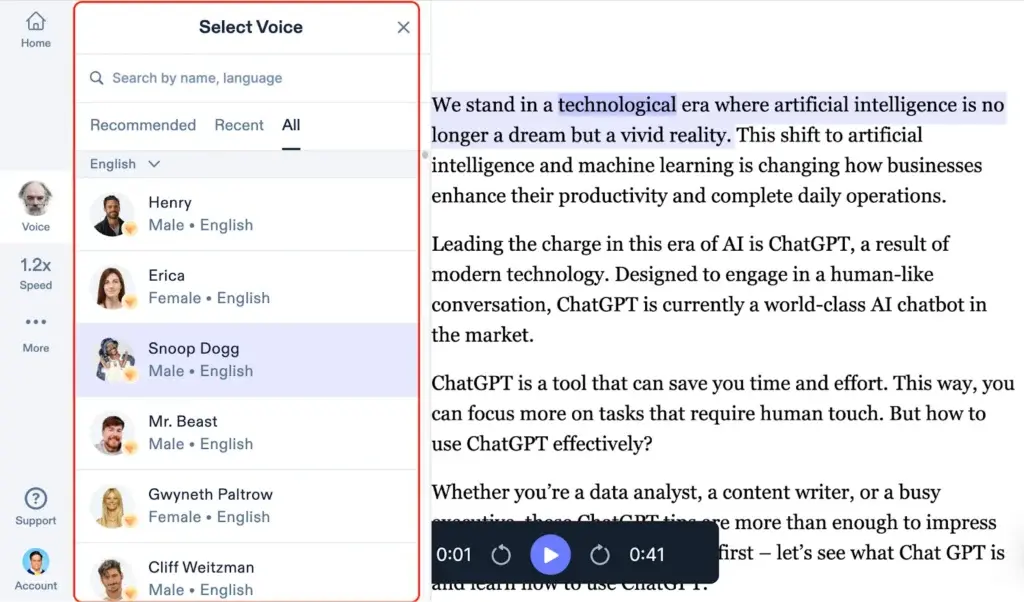
What makes it stand out: playback speeds up to 4.5x, natural-sounding voices, and apps across nearly every platform. It's less a voiceover tool and more a "turn any text into audio" tool.
Key features:
- Text and document import
- Natural AI voices
- Cross-platform apps
- OCR scanning for printed text
- Adjustable playback speed
Pricing: Free (~600 credits/mo, about 10 minutes) | Premium plans start around $19/mo.
Best for: students, readers, and anyone who wants existing text read back to them without editing a script.
Not ideal for: commercial voiceover projects — the free tier doesn't include commercial usage rights, watermark or not.
3. Fish Audio — Best Budget Upgrade Path
Fish Audio is worth a look if you expect to outgrow a free plan quickly and want the cheapest realistic upgrade path. There's no confirmed audible watermark on its free-tier output.

What makes it stand out: a massive voice library (2 million+ voices), sub-300ms real-time streaming, and the lowest-priced paid tier of any tool on this list.
Key features:
- 2M+ voice library
- Real-time streaming
- Emotion tags
- Voice cloning
- 70+ language support
Pricing: Free (personal use) | Plus $5.50/mo — the cheapest commercial-ready tier here.
Best for: creators who want the option to upgrade cheaply once they need commercial rights.
Not ideal for: any commercial project while still on the free tier — it's restricted to personal use.
Tools to Avoid If a Watermark-Free Download Matters
Not every popular "free" AI voice tool belongs on this list, and it's worth saying so directly.
Murf AI doesn't even give you a clean file to download on its free plan — output is watermarked with Murf branding and locked to preview-only use until you upgrade, with no commercial rights either way, confirmed in Murf's own help center [OPEN IN NEW TAB]. LOVO AI does the same in spirit — both its free plan and free trial watermark exports, and only a paid subscription removes it.
If a clean, watermark-free file is the whole point, skip these two for now. Curious how Murf stacks up against the tool we just recommended? See our ElevenLabs vs Murf AI comparison for YouTube voiceovers for the full breakdown.
How to Choose the Right Tool
Start with what you actually need the audio for. Reading your own notes or an article back to you? Speechify is built for that.
Producing a real voiceover with no watermark and room to grow? ElevenLabs is the safest default.
Expecting to need commercial rights soon and want the cheapest upgrade path? Fish Audio's $5.50/mo tier beats everything else on this list.
Still not sure, or weighing criteria beyond just watermarks? See our full AI voice generator tools comparison or browse the full AI Audio and Voice category to compare every option side by side.
Frequently Asked Questions
Do free AI text-to-speech tools add a watermark? It depends on the tool. Some, like Murf AI and LOVO AI, add an audible or visible watermark to every free-tier export. Others, like ElevenLabs and Speechify, don't watermark the audio itself but still restrict free-tier output to non-commercial use.
Is ElevenLabs' free plan watermarked? No. ElevenLabs doesn't add an audio watermark to free-tier text-to-speech downloads. Its video export and dubbing features do watermark free-tier output, but plain TTS audio comes out clean.
Does Murf AI have a watermark on the free plan? Yes. Murf's free tier watermarks output with Murf branding and doesn't even give you a clean file to download — it's preview-only until you upgrade, and commercial use is blocked entirely either way.
Can I use free AI voice generator audio for YouTube or commercial projects? Rarely, even without a watermark. Most free plans — including Fish Audio's — restrict output to personal, non-commercial use regardless of whether the audio itself is watermarked.
What's the best truly free text-to-speech tool with no watermark? ElevenLabs, for realistic voices and a genuine monthly free quota. Speechify is the next best option if the job is simply reading existing text aloud rather than producing a scripted voiceover.
Final Verdict
If you want one answer: use ElevenLabs. It's the only tool here that pairs a real free quota with genuinely watermark-free audio and no forced attribution.
I'd only reach for Speechify instead if the task is reading text I already wrote, not generating a new voiceover from scratch — see our Speechify vs ElevenLabs comparison for exactly how the two stack up on voice quality. Either way, check whether you actually need commercial rights before you commit — that catches more people than the watermark ever does.