AI Image Generation Cost Calculator (2026): What You'll Really Pay Per Usable Image

On this page8 sections
- Calculate Your Real AI Image Generation Cost
- The 6 Things That Quietly Multiply Your Bill
- How the AI Image Generation Cost Calculator Works
- Quick Comparison: Real Cost Per Image by Tool
- Tool-by-Tool: What Actually Drives the Real Cost
- Midjourney — Unlimited Slow Queue Is the Real Lever
- ChatGPT Images GPT Image 2 — Pay-Per-Image With No Cushion
- Stable Diffusion Local — Free Only Once the Hardware Is Paid Off
- Adobe Firefly — Check Your Creative Cloud Plan First
- Leonardo.ai — Generous Free Credits Change the Math at Low Volume
- Common Mistakes That Inflate Your AI Image Bill
- Frequently Asked Questions
- Final Verdict
- The price on a plan page isn't what a finished image actually costs you — failed attempts, tweaks, and expired credits usually push the real number 2-5x higher.
- Use the calculator below: answer a few questions about your situation and get your true cost per usable image, for every major tool, ranked by real cost instead of sticker price.
- It also shows your single biggest cost lever and exactly where a subscription stops being cheaper than paying per image.
- Advertised per-credit or per-month pricing assumes every generation is a keeper — most people need several attempts per usable image, and that gap is the real cost driver.
- Unused monthly credits almost never roll over, so uneven month-to-month usage quietly forfeits money every billing cycle.
- Tweaks, variations, and upscales are billed as new generations on most platforms, not treated as free polish.
- Resolution matters more than people think — 2K and 4K outputs cost more credits on every attempt, including the ones you reject.
- The interactive calculator below turns all of this into one real number instead of a sticker price.
AI Image Generation Cost Calculator (2026): What You'll Really Pay Per Usable Image
Every AI image tool's pricing page quotes a monthly fee or a per-credit rate like it converts directly into finished images. It doesn't. Some of those generations fail, some get rejected because the output just isn't right, and some get regenerated, upscaled, or tweaked before they're actually usable — most platforms bill each of those as a brand-new generation.
Add unused credits expiring at the end of a slow month, and the number on the pricing page stops meaning much.
This calculator does the actual math. Tell it what you're making, how many finished images you need a month, and your experience level, and it converts sticker price into a real cost per usable image for every major tool — not the advertised rate, the one you'd actually pay. After that, we'll walk through the six factors it accounts for and give you honest, tool-by-tool notes on what actually drives the waste.
Calculate Your Real AI Image Generation Cost
Answer a few quick questions below and get your true cost per usable image across every major AI image tool, ranked by what you'd actually pay — not the sticker price.
That's your real number. If you want to understand exactly what's driving it, here are the six factors the calculator just adjusted for on your behalf.
The 6 Things That Quietly Multiply Your Bill
These are the exact six factors the calculator above weighs, and why the sticker price alone hides all of them:
- How often you get one you'd use (hit rate) — most people keep far fewer generations than they expect going in, and a low hit rate multiplies every other cost on this list.
- How big the images need to be — resolution is billed roughly by megapixel on most platforms, on every attempt, including the ones you throw away.
- Tweaks per finished image — variations, upscales, and inpainting are billed generations too, not free polish on an already-finished image.
- How evenly you use it month to month — unused credits typically expire at the billing reset, so a lumpy usage pattern (busy weeks, quiet weeks) forfeits real money every cycle.
- How often a generation fails or gets blocked — most platforms still charge you for it, whether or not you get a usable result.
- Your own review time (optional) — reviewing dozens of failed attempts to find one keeper has a real cost if your time has a rate attached to it.
How the AI Image Generation Cost Calculator Works
It models attempts-per-keeper as a range, not a single average, so a genuinely bad month is included in the estimate instead of hidden by it. Plan choice is optimized per tool too — every pricing tier for each platform is tested against a simulated 12-month usage pattern, including overage charges, and the cheapest one wins automatically.
Expired credits are simulated month by month based on how evenly you say you use the tool, since unused allowance is treated as lost the way most subscription plans actually work. This is a planning model, not a quote — prices are estimates and change often, and commercial-rights or privacy terms vary by tool and plan, which this calculator doesn't assess.
Quick Comparison: Real Cost Per Image by Tool
| Tool | Pricing Model | Starting Price (USD/mo) | Works Locally | Free Tier |
|---|---|---|---|---|
| Midjourney | Subscription | $10 | No | No |
| ChatGPT Images (GPT Image 2) | Pay-per-image | ~$0.04/image | No | No (via API) |
| Stable Diffusion (local) / Flux (hosted) | Local hardware / Pay-per-image | $0 local after hardware / ~$0.02/image hosted | Yes (local) | Yes (hosted) |
| Adobe Firefly | Subscription | $10 | No | Yes |
| Leonardo.ai | Subscription | $12 | No | Yes |
| Ideogram | Subscription | $8 | No | Yes |
| Recraft | Subscription | $12 | No | Yes |
| Google Imagen | Pay-per-image | ~$0.03/image | No | No |
| Krea | Subscription | $10 | No | Yes |
Every number here is a starting point, not what you'd actually pay — the calculator above ranks these by real cost per keeper, scaled to your own hit rate and volume, not this sticker price. Here's what actually drives the real number for each one.
Tool-by-Tool: What Actually Drives the Real Cost
Midjourney — Unlimited Slow Queue Is the Real Lever
Midjourney runs on four subscription tiers from $10 to $120 a month, priced by how many "fast" generations you get. The number that actually matters is different: Standard and above include unlimited slow-queue generations, which is the single biggest way to cut your real cost per image if you can tolerate waiting longer for a result instead of paying for speed.

According to Midjourney's own documentation on GPU speed modes [OPEN IN NEW TAB], Relax mode is unlimited on the Standard, Pro, and Mega plans — it just queues your prompt behind other Relax requests instead of running it instantly.
The catch: there's no free tier, so you're committing before you've tested your own hit rate on it. Best for steady, high-volume use where the unlimited slow queue absorbs your failed attempts at no extra cost. Not ideal if your volume is low or unpredictable — you'll be paying for a monthly allowance you don't fully use.
ChatGPT Images (GPT Image 2) — Pay-Per-Image With No Cushion
ChatGPT's image generator, GPT Image 2, replaced DALL·E 3 after OpenAI retired it on May 12, 2026. Billed per image via OpenAI's official API pricing documentation [OPEN IN NEW TAB] at roughly $0.04-0.05 for a medium-quality generation, there's no monthly allowance to waste — every generation costs the same whether it's your first attempt of the month or your five hundredth.
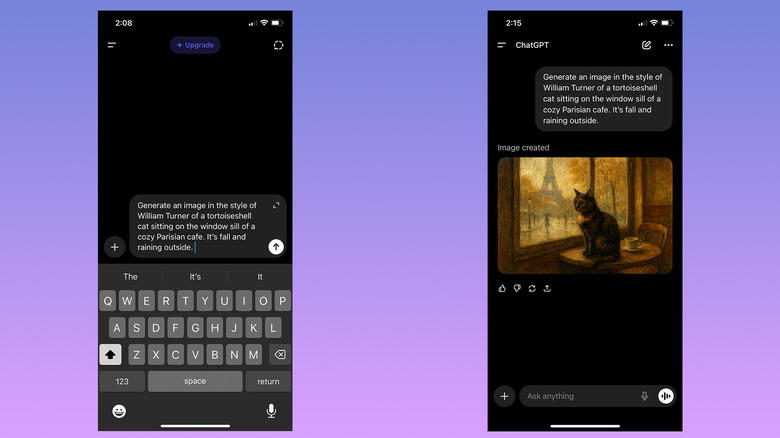
The catch: that also means nothing cushions a heavy month. Cost scales linearly with volume, so it stops being the cheapest option once your usage gets high and steady enough that a subscription's unlimited or high-allowance tier would work out cheaper per image.
Best for low or unpredictable monthly volume. Not ideal once you're generating enough that a flat-fee plan would beat per-image pricing.
Stable Diffusion (Local) — Free Only Once the Hardware Is Paid Off
Running Stable Diffusion on your own hardware amortizes the machine's cost over roughly three years, plus electricity, against every generation you run. At real volume, that works out to a fraction of a cent per image — effectively free compared to any subscription or per-image tool. Hosted versions (including Flux-based models) skip the hardware but charge per image instead, typically a couple of cents each.

The catch: the upfront hardware cost makes local generation a poor deal at low volume, and setup — drivers, models, a capable GPU — is a real barrier if you just want to type a prompt and get a picture. Best for high, sustained volume and anyone optimizing for the lowest possible marginal cost. Not ideal for someone who wants a result in the next two minutes with zero setup; see our full Stable Diffusion vs Leonardo AI comparison if you're weighing it against a lower-effort alternative.
Adobe Firefly — Check Your Creative Cloud Plan First
Adobe Firefly runs on a free tier plus two paid tiers starting at $10 a month. The detail most pricing guides skip: Firefly credits are frequently already bundled into a Creative Cloud subscription plenty of readers are already paying for, which means the real marginal cost for them is zero — see Adobe Firefly's free plan in full detail for exactly what the free tier covers before you assume you need to pay anything.

The catch: outside the Adobe ecosystem, or once you're past the bundled allowance, per-generation overage is priced higher than the plan itself. Best for anyone already inside Creative Cloud, or teams that need Firefly's clean, licensed-content commercial terms. Not ideal if you want the cheapest possible per-image rate and don't already pay for Adobe's other tools.
Leonardo.ai — Generous Free Credits Change the Math at Low Volume
Leonardo.ai hands out daily free credits on top of its paid tiers, which makes it unusually cheap to actually test your hit rate on before you commit to a subscription — most competitors only give you a one-time trial, not a renewing daily allowance. We tested exactly how far Leonardo AI's free daily tokens stretch for real client work if you want the full breakdown.

The catch: at low, occasional volume the daily free credits can cover most of what you need, but the moment your usage becomes steady and high, the paid tiers' overage pricing is where the real cost shows up. Best for testing thoroughly before paying, or for volume that fits inside the free daily allowance. Not ideal if you need a large, predictable batch every single day — you'll outgrow the free tier fast.
Ideogram (best for legible text in images), Recraft (true vector output), Google Imagen (usage-based through Google's API), and Krea (a real-time canvas for exploring a look before committing to a final render) are all in the calculator's comparison set above too — each is worth checking directly if one of those specific strengths matters more to you than raw cost.
Common Mistakes That Inflate Your AI Image Bill
- Comparing tools by sticker price alone instead of real cost per keeper at your own hit rate — a cheaper credit rate can still cost more per finished image if it takes you twice as many attempts.
- Buying a bigger plan than your usage pattern needs, then losing the difference to expired monthly credits every cycle you don't fully use it.
- Generating at 4K or print resolution for early drafts instead of searching for the idea at standard resolution first and only upscaling the keeper.
- Not counting tweaks, upscales, and re-rolls as billed generations when estimating a monthly budget — they're new generations on most platforms, not free polish.
- Ignoring your own review time when a cheaper tool actually needs far more attempts per keeper — the hours add up even when the credits are cheap.
Once you know your real number, browse the full AI image generator tools category on YourAiFinder to compare features and alternatives before committing to a plan.
Frequently Asked Questions
How much does it really cost to generate one AI image? It depends heavily on your hit rate and how many tweaks you make, not just the sticker price. A tool advertised at $0.04 per generation can easily cost $0.20-$0.40 per finished, usable image once failed attempts and touch-ups are counted — use the calculator above to get your own number instead of a generic estimate.
Do unused AI image credits roll over? Almost never on subscription plans. Unused monthly allowance is typically forfeited when the billing cycle resets, which is exactly why uneven month-to-month usage quietly wastes money even on a plan that looked like the right size.
Is Midjourney or a pay-per-image tool cheaper? It depends on your volume. Subscriptions like Midjourney are cheaper at high, steady volume because the per-image cost falls as you use more of the allowance. Pay-per-image tools like ChatGPT Images are cheaper at low or unpredictable volume, since there's no unused allowance to waste.
Do failed or blocked AI image generations still cost money? On most platforms, yes — the generation is billed, or the credit is consumed, whether or not the output is usable. That's a major hidden cost driver that sticker-price comparisons never mention.
Does image resolution affect AI image generation cost? Yes. Most platforms charge credits roughly in line with megapixels, so generating at 4K or print resolution multiplies the cost of every attempt, including the ones you reject, not just the final keeper you keep.
Is running Stable Diffusion locally actually cheaper than a subscription? At high volume, yes, once you amortize the hardware cost and electricity over enough images. At low volume, the upfront hardware cost makes it the more expensive option per image compared to a subscription or pay-per-image tool.
Final Verdict
There's no single "cheapest" AI image tool — it depends entirely on your own hit rate, your monthly volume, and how evenly you actually use it. That's exactly why a flat comparison table can't answer this the way the calculator at the top of this page can.
If you want a fast rule of thumb without running the numbers: steady, high-volume users tend to land on a subscription with an unlimited or high generation allowance (Midjourney), low or unpredictable volume tends to favor pay-per-image (ChatGPT Images), and genuinely high-volume users willing to set up hardware do best with local Stable Diffusion. These are estimates, not quotes, and this isn't paid placement — run your own numbers above before you commit to a plan.
Cost is only half the decision, though. If you're still weighing quality and fit as much as price, see which AI image generator actually fits what you're making for the other half of the picture.