How to Write Job Descriptions with AI Free in 2026

On this page8 sections
- What You Need Before You Start
- The Best Free AI Tools for Writing Job Descriptions in 2026
- 1. ChatGPT Free — Best for Quality Output
- 2. HuggingChat — Best for Zero Account Required
- 3. Textio — Best for Inclusive Language Paid
- Step-by-Step: Writing Your Job Description with AI
- Step 1 — Gather Your Role Information
- Step 2 — Open Your AI Tool and Start a New Chat
- Step 3 — Write Your First Prompt Template Included
- Step 4 — Edit the AI Output
- Step 5 — Run a Bias Check Before You Post
- Common Mistakes to Avoid
- Pro Tips
- Using These Tools in India
- Frequently Asked Questions
- The Faster Path to a Better JD
- ChatGPT free tier writes a complete JD draft in under 2 minutes — account required (Google login, 30 seconds, no credit card)
- HuggingChat (chat.huggingface.co) requires zero account creation — fully free, uses Meta's Llama models
- Recooty (recooty.com/tools/job-description-generator) and HighPerformr (highperformr.ai/tools/ai-job-descriptions-generator) offer dedicated free JD generators — no signup required, confirmed
- AI always produces a first draft — editing for bias, India-specific fields (CTC, notice period), and your company's voice takes 10–15 minutes
- Textio is the paid upgrade when bias-free inclusive language matters at scale (10+ hires/year)
How to Write Job Descriptions with AI for Free in 2026 (No Signup)
Writing a job description manually takes 1–2 hours. Getting a solid first draft from AI takes under 2 minutes — and anyone can write job descriptions with AI for free using the prompt template in Step 3. The gap isn't in quality — it's in knowing which free tools work, which ones actually require no account, and what prompt to use to get output that's actually usable.
Fastest path: ChatGPT free tier + the prompt template in Step 3. Want zero friction and no account at all? HuggingChat works without any signup. This guide covers the tools, the exact prompt, a bias-check step before posting, and the India-specific fields that AI omits by default.
What You Need Before You Start
| Tool | Free? | No Signup? | Best For |
|---|---|---|---|
| HuggingChat | Free forever | ✅ No signup | Zero-friction start |
| ChatGPT Free | Free (account req'd) | Google login only | Highest quality output |
| Recooty JD Generator | Free | ✅ No signup | Dedicated JD tool |
| Textio | Paid | Account required | Inclusive language at scale |
Before you open any tool, gather these in a doc or note:
- Role title and seniority level (Junior / Mid / Senior / Lead)
- Team name and who the role reports to
- 5 core responsibilities as rough bullet points (your words, not polished)
- Required skills and experience level (years + specific tools/technologies)
- Employment type and location
- Work arrangement: on-site / hybrid / remote
- Salary range or CTC range — never skip this; AI omits it without input
With these ready, the entire process takes under 20 minutes. Browse the AI HR and recruiting tools on YourAiFinder to compare additional options beyond what this guide covers.
The Best Free AI Tools for Writing Job Descriptions in 2026
1. ChatGPT Free — Best for Quality Output
ChatGPT's free tier is the strongest AI writer available at zero cost. It has no word limit for job description writing, handles technical roles well, and follows structured formatting instructions reliably. You need a free account — Google OAuth login takes under 30 seconds and requires no credit card.

The free tier generates one response at a time without memory of previous conversations, which is fine for JD writing — you write the prompt once and get a complete draft in a single pass.
- Free plan: Unlimited JD writing, no word limit, no daily cap on JD-length prompts
- Account required: Yes — Google login or email (no credit card)
- Best for: Founders and HR managers who want the highest-quality free AI output
- Not ideal for: Truly zero-account use cases
2. HuggingChat — Best for Zero Account Required
HuggingChat (chat.huggingface.co) is the best option if you want to write a JD right now without creating any account. It's built and hosted by Hugging Face, uses Meta's Llama models, and is completely free with no rate limits for JD-length prompts.

Output quality is slightly below ChatGPT for nuanced writing, but it follows formatting instructions well and produces a usable first draft for most roles. For technical roles with specific stack requirements, ChatGPT produces noticeably better output.
- Free plan: Fully free, no account, no rate limits on standard queries
- Account required: No — open the URL and start typing
- Best for: True no-signup use, quick tests, or when you need to write a JD on a device that's not signed into anything
- Not ideal for: Complex senior technical roles where precise language matters
3. Textio — Best for Inclusive Language (Paid)
Textio is the only tool in this list built specifically for hiring content rather than general writing. As you write or paste a JD, it flags gendered language, inflated requirements, and culture-fit buzzwords in real time and suggests replacements.
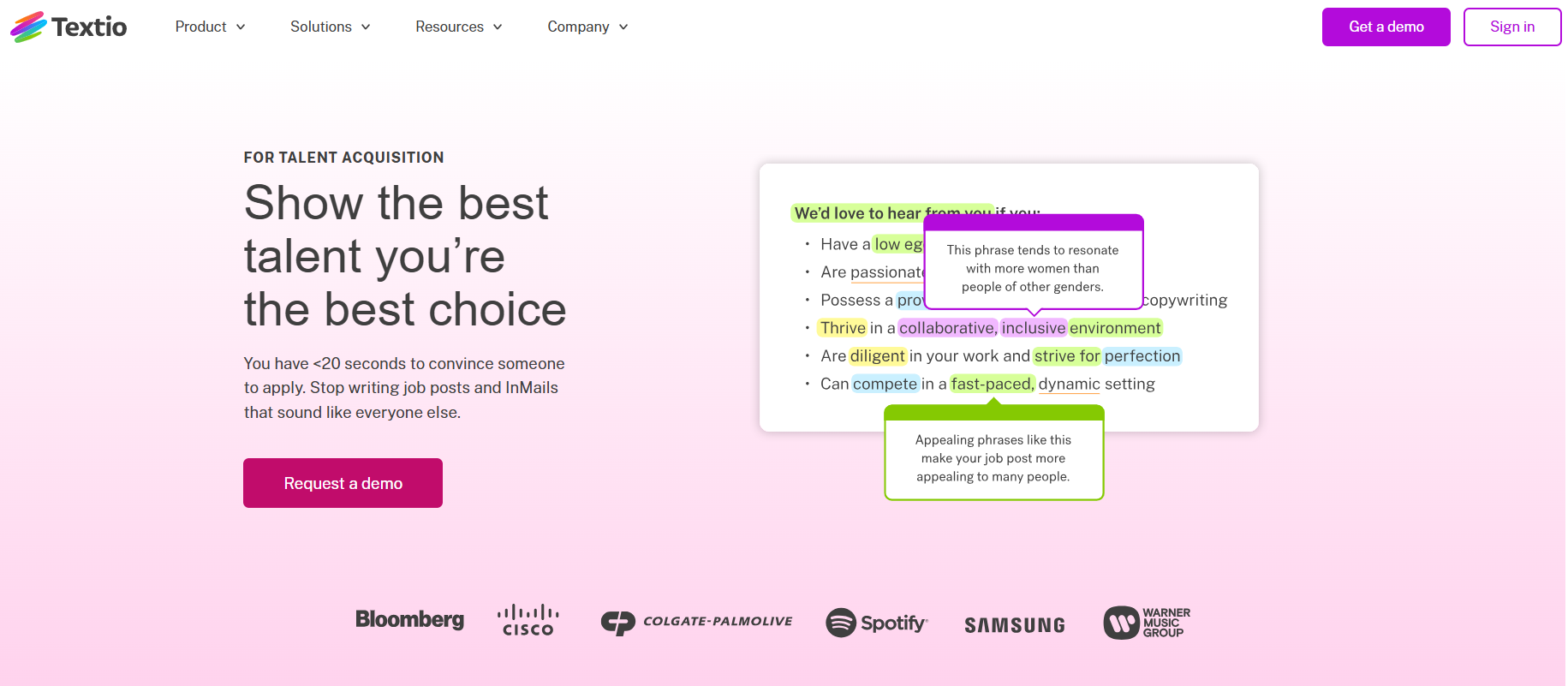
It's not free. For teams making fewer than 5 hires per year, ChatGPT plus the manual bias check in Step 5 covers the same ground at zero cost. Textio earns its price when inclusive hiring is a documented priority and you're writing 10+ JDs per year.
- Free plan: No — paid subscription
- Account required: Yes
- Best for: HR teams where inclusive language is a compliance or equity priority at scale
- Not ideal for: One-off JD writing or tight budgets
Step-by-Step: Writing Your Job Description with AI
Step 1 — Gather Your Role Information
Before opening any AI tool, collect these inputs. The quality of your output directly reflects the quality of your input — vague inputs produce generic JDs.
Checklist:
- Role title (exact, not a vague team title)
- Team name and headcount
- Reporting structure
- 5 responsibilities (rough notes are fine; AI will polish them)
- Required skills and experience
- Nice-to-have skills
- Employment type and location
- Work arrangement (on-site / hybrid X days / full remote)
- Compensation range or CTC range
Spend 5 minutes filling this in before opening any tool. Skipping this step is the most common reason AI JD output is generic.
Step 2 — Open Your AI Tool and Start a New Chat
Open a fresh chat session — not a conversation you've already been using for something else. AI carries context from previous messages in the same session; starting fresh means your JD gets the full model attention.
- ChatGPT: chat.openai.com → New Chat
- HuggingChat: chat.huggingface.co → New Conversation
You'll paste the full prompt once and get a complete draft back. No need for multi-turn back-and-forth on the first pass.
Step 3 — Write Your First Prompt (Template Included)
Copy this template, fill in your details from Step 1, and paste it in one go:
Write a professional job description for this role:

Role Title: [e.g., Product Manager]
Company: [Company Name] — [one sentence on what you do]
Team: [e.g., 8-person Product team]
Reports to: [e.g., VP Product]
Location: [City, Country]
Work arrangement: [Remote | Hybrid X days/week in-office | On-site full-time]
Employment type: [Full-time / Part-time / Contract]

Key responsibilities (paste your rough notes):
1. [Responsibility]
2. [Responsibility]
3. [Responsibility]
4. [Responsibility]
5. [Responsibility]

Required:
- Experience: [X years in relevant role/domain]
- Skills: [list technical + soft skills]

Nice to have:
- [Optional skills/experience]

Compensation: [Salary range or CTC range]

Format: Write a complete job description with:
(1) 2-sentence company overview
(2) "What You'll Do" section — 5–7 responsibilities
(3) "What We're Looking For" — required and preferred qualifications
(4) Compensation details
(5) Equal opportunity statement

Use gender-neutral language throughout. Avoid buzzwords: rockstar, ninja, competitive culture, aggressive growth, fast-paced. Keep the total under 400 words.
This template produces a complete, post-ready first draft in one pass. Every field you fill in reduces generic filler in the output.
Step 4 — Edit the AI Output
AI gets you to a 70% draft. The remaining 30% is what makes it sound like your company, not every other posting. Three mandatory edits:
- Replace the company overview — AI writes a generic description of what your company does; replace it with one or two sentences that reflect your actual culture and what makes your team different.
- Verify technical specifics — AI sometimes fills in plausible-sounding technical requirements that don't match your actual stack. Read every skill and tool name against what your team actually uses.
- Strip the buzzwords that slipped through — Despite the instructions, AI still inserts "fast-paced", "dynamic", or "team player" into most JDs. Delete them. These phrases add zero information and experienced candidates filter them out.
Step 5 — Run a Bias Check Before You Post
Four patterns to check manually:
- Masculine-coded adjectives — "competitive", "assertive", "dominant", "aggressive" are identified in hiring research as language patterns associated with male-dominated job postings. Note that a MIT Sloan Management Science study [OPEN IN NEW TAB] found the practical effect on applicant pools is smaller than commonly assumed — but auditing these patterns is still standard inclusive hiring practice. Replace with: "results-oriented", "accountable", "collaborative", "high-ownership".
- Inflated degree requirements — AI adds "Bachelor's or Master's degree" as a default. If the role doesn't actually require a degree, remove it. Unnecessary degree requirements filter out qualified candidates who have the skills without the credential.
- Culture-fit language — "work hard play hard", "wear many hats", "no ego" can screen out candidates with legitimate boundaries and are often applied unevenly across candidate pools. Cut or replace with specific team norms.
- Requirements list length — AI often outputs 8–10 required skills for roles that realistically need 5–6. Trim to what the role genuinely requires. Shorter, more accurate requirements lists attract better-matched candidates.
Textio catches all four of these automatically as you write. If you're doing this manually, work through the list above before posting.
Colorado's SB 26-189 [OPEN IN NEW TAB] (signed May 2026, effective January 1, 2027) requires employers to disclose when automated decision-making technology materially influences hiring decisions. If you use AI tools in your candidate screening or selection process — not just JD writing — check whether your tools fall under this requirement.
Common Mistakes to Avoid
-
Pasting the AI output directly without editing. AI defaults to filler language ("fast-paced environment", "team player", "dynamic startup") that makes the JD indistinguishable from every other posting. The template is the starting point, not the finished product.
-
Skipping the compensation field in the prompt. AI omits salary or CTC unless you provide it. Including compensation in the JD increases qualified application rates and reduces wasted screening time — skip it and you're filtering by accident.
-
Using a vague one-line prompt instead of the structured template. "Write me a JD for a software engineer" produces a generic two-page template that applies to no company specifically. The structured prompt from Step 3 produces an actual working first draft.
Pro Tips
-
Verify how your JD parses through ATS systems. Candidates run their resumes through ATS compatibility checkers before applying. Jobscan shows how your JD reads to those same ATS tools from the employer side — catch parsing problems before candidates start filtering themselves out.
-
Save your prompt as a template file per role type. The first JD prompt takes 10 minutes to build with all the inputs filled in. Once you have it, duplicating and editing for a similar role takes 2–3 minutes. Build one template per common role type (engineer, designer, sales, ops).
-
Chain writing with sourcing. Once your JD is live, the keywords you just wrote are your natural-language search query. Juicebox lets you paste a job description and search its 800M+ profile database for passive candidates who match it. The better your JD is written, the better your Juicebox results.
Using These Tools in India
CTC vs salary: Indian JDs use CTC (Cost to Company) — total annual compensation including base salary, performance bonus, employer PF contribution, and other benefits. AI tools default to "salary" which is ambiguous in Indian employment context. Add CTC range: ₹[X] to ₹[Y] LPA (annual, all-inclusive) to your prompt explicitly.
Notice period: Standard Indian notice periods are 30–90 days depending on seniority — not 2 weeks as AI defaults to. Include the notice period you'll accept in the JD; candidates with mismatched timelines will self-filter.
Work arrangement specificity: Since 2021, Indian candidates have strong expectations around WFH and hybrid. State the arrangement clearly — "3 days/week from our [City] office" is better than "hybrid." Ambiguity generates mismatched applications.
Equal opportunity statement: AI tools trained on US datasets include EEOC language by default. Replace it with India-appropriate language referencing the Rights of Persons with Disabilities Act 2016 for roles open to all candidates.
DPDPA 2023 compliance: Application forms linked from your JD must collect candidate consent before processing personal data. Ensure your ATS or application form includes a consent checkbox. Freshteam and Zoho Recruit include consent templates; Western SaaS tools often don't.
Add this block to your prompt for India-specific JDs:
Add these India-specific fields:
- CTC range: ₹[X] to ₹[Y] LPA (annual, all-inclusive)
- Notice period acceptable: [Immediate / 15 / 30 / 60 / 90 days]
- Work arrangement: [On-site | Hybrid X days/week | Full WFH]
- Work location: [City, State, India]
- Work authorization: [Indian nationals only / Open to all nationalities]
Frequently Asked Questions
What is the best free AI tool for writing job descriptions with no account?
HuggingChat (chat.huggingface.co) requires zero account creation. Recooty (recooty.com/tools/job-description-generator) and HighPerformr (highperformr.ai/tools/ai-job-descriptions-generator) are confirmed free JD-specific tools with no signup required. For highest-quality output, ChatGPT free tier requires a Google login (30 seconds, no credit card) but produces noticeably better results for complex roles.
Can I use ChatGPT to write job descriptions for free?
Yes. ChatGPT's free tier writes complete job descriptions with no word limit or daily cap on JD-length prompts. You need a free account (Google OAuth, no credit card). Use the structured prompt template from Step 3 — vague prompts produce generic output that doesn't represent your role or company accurately.
Do AI-written job descriptions introduce bias?
AI models trained on historical job postings reproduce historical language patterns, including masculine-coded adjectives and inflated degree requirements. Research suggests the practical effect on applicant diversity is smaller than assumed, but auditing output before posting is standard inclusive hiring practice.
Step 5 in this guide covers the four patterns to check manually. Textio catches these automatically at scale. Colorado's SB 26-189 (effective January 1, 2027) requires disclosure when AI materially influences hiring decisions — this applies more to screening tools than JD writing, but review your full workflow if you operate in Colorado-jurisdiction employment contexts.
How long does it take to write a job description using AI?
With the structured prompt template, AI produces a complete first draft in under 2 minutes. Editing the output — replacing generic language, verifying technical specifics, and running the bias check — takes 10–15 minutes. Total: under 20 minutes versus 1–2 hours writing from scratch.
The Faster Path to a Better JD
The prompt template in Step 3 is the difference between AI output that's generic and output that's actually useful. Pair it with the bias check in Step 5 — 5 extra minutes before posting prevents mismatched applications and potential compliance issues.
Once your JD is live and applications start coming in, you'll need an ATS to manage them. Manatal offers a 14-day free trial (no credit card) with AI candidate ranking, starting at approximately ₹1,200/month. For free-forever ATS options, see our guide to building a free AI recruiting stack for Indian startups — it covers Zoho Recruit, Freshteam, and the complete zero-cost hiring workflow.
My honest take: I've used this exact template across multiple hiring rounds. The AI does the structural work; you add the soul. The 15-minute editing step is not optional — it's where your JD stops sounding like everyone else's.