Cal.com vs Calendly vs Google: Free Interview Scheduling 2026

On this page11 sections
- Cal.com vs Calendly vs Google: Free Interview Scheduling 2026
- Three Tools, Three Free Plans — At a Glance
- Cal.com Free Plan — Best for Most Solo Recruiters
- Calendly Free Plan — Best If You Only Need One Interview Type
- Google Calendar Appointment Schedules — Best for Google Workspace Teams
- Feature-by-Feature Breakdown
- Event Type Flexibility
- ATS and Calendar Integrations
- Candidate Experience
- Pricing — What the Free Tiers Actually Cover
- Which Tool Is Right for You?
- Using These Tools in India
- Frequently Asked Questions
- Our Verdict
- Best for solo recruiters running multiple interview types: Cal.com free — unlimited event types, no credit card, IST-compatible
- Best if you only need one interview format: Calendly free — polished UX, widely recognised by candidates
- Best for Google Workspace teams: Google Calendar appointment schedules — zero setup, already in your stack
- Enterprise upgrade path: GoodTime — AI-powered scheduling for high-volume teams ($15k+/year)
- Calendly's free plan limits you to 1 active event type — a dealbreaker if you run phone screens, technical rounds, and culture fits simultaneously
- Cal.com's free plan includes unlimited event types and calendar connections with no credit card required, making it the strongest free option for multi-format hiring
- Google Calendar appointment schedules are completely free for personal Google accounts; automated reminders require a Workspace subscription
- None of these three tools support UPI billing on paid plans — except Google Workspace, which accepts Indian payment methods
- All three detect IST timezone automatically — no configuration needed for Indian candidate scheduling
Cal.com vs Calendly vs Google: Free Interview Scheduling 2026
If you've set up Calendly's free plan for interview scheduling, you've probably hit this wall: you can only have one active event type at a time. So your 30-minute phone screen link is live, but the moment you need to share a 60-minute technical interview link, you have to deactivate the phone screen first. For a recruiter managing multiple candidate stages simultaneously, that's a genuine workflow problem.
The good news is that Calendly isn't your only option. Cal.com's free tier gives you unlimited event types at zero cost, and Google Calendar's appointment schedules — often overlooked — work surprisingly well for teams already in the Google ecosystem. This comparison cuts through the noise: here's exactly what each free plan covers, where each one breaks down, and which one fits your hiring workflow in 2026.
Three Tools, Three Free Plans — At a Glance
| Tool | Best For | Event Types (Free) | Calendar Connections (Free) | ATS Integration | Credit Card Required |
|---|---|---|---|---|---|
| Cal.com | Solo recruiters, multi-format hiring | Unlimited | Unlimited | Via Zapier (free) | No |
| Calendly | Single-format interviews, polished UX | 1 active | 1 | Native (paid plans only) | No |
| Google Calendar | Workspace teams, simple scheduling | Unlimited booking pages | Google only | None | No |
Cal.com Free Plan — Best for Most Solo Recruiters
Cal.com is an open-source scheduling platform that offers one of the most genuinely useful free plans in the category. The single biggest advantage for recruiters: unlimited event types.
That means you can have a 15-minute candidate pre-screen link, a 60-minute technical interview link, and a 30-minute hiring manager culture fit link all live simultaneously — at zero cost. No juggling. No deactivating one to activate another.
- Unlimited event types on free tier
- Multiple calendar connections (Google, Outlook, iCloud, Exchange)
- Email and SMS notifications included
- IST timezone auto-detection for Indian candidates
- Payment collection via Stripe/PayPal (useful for freelance consultations)
Pricing: Free (1 user, Cal.com's free plan details) | Teams: $12/user/month | Organizations: $28/user/month
Best for: Solo HR managers, freelance recruiters, and founders handling fewer than 20 hires per year who need multiple interview formats without paying.
Not ideal for: Teams that need direct ATS integration (Greenhouse, Lever) without setting up a Zapier workflow. Cal.com's native ATS connections are mostly on paid plans.
Calendly Free Plan — Best If You Only Need One Interview Type
Calendly is the category standard for a reason. The booking UX is polished, candidates recognise the interface, and it connects to Google Meet and Zoom automatically. If you send a Calendly link, most candidates know exactly what to do.

The problem is that 1 event type limit. In practice, it means you have one live booking link at any given time. If you're running a consistent, single-format hiring process — say, every first conversation is a 30-minute video call — that's fine. But the moment your process has multiple stages or multiple formats, you'll hit the wall within the first week.
- 1 active event type (hard limit on free tier)
- 1 calendar connection (Google, Outlook, Office 365, or iCloud)
- Zoom and Google Meet links auto-generated
- Shareable booking link and embeddable on your careers page
- Mobile app for iOS and Android
Pricing: Free (1 event type, 1 calendar) | Standard: $10/seat/month | Teams: $16/seat/month | Enterprise: $15,000/year minimum
Best for: Recruiters running a single, uniform interview format who want a tool candidates already trust and a clean mobile experience.
Not ideal for: Multi-stage hiring workflows, or teams that want ATS integrations (Greenhouse, LinkedIn Recruiter, Lever) without upgrading to the $10–16/month paid tiers.
Google Calendar Appointment Schedules — Best for Google Workspace Teams
Google moved to appointment schedules in 2024, retiring the old "appointment slots" feature. The current version is more capable: you create a booking page, set your availability, and share a link. Anyone — including candidates without a Google account — can pick a time and book directly into your calendar, with a Google Meet link auto-generated for video interviews.
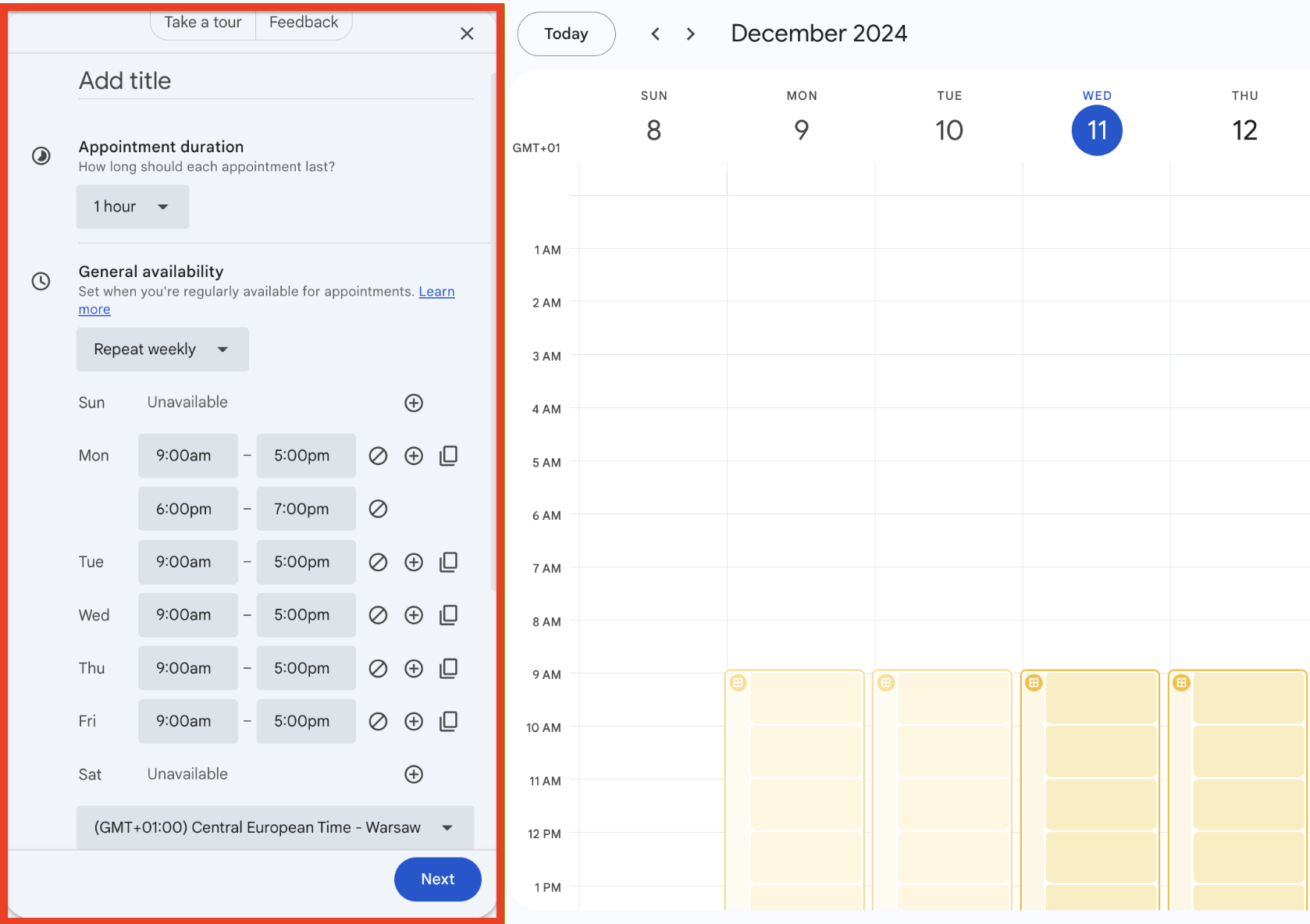
If your team already runs on Google Workspace, this is genuinely the path of least resistance. There's nothing new to sign up for, no integration to configure, and no candidate friction. The limitation is customisation: you can't route technical candidates to one calendar and managerial candidates to another without a more complex setup.
- Multiple booking pages possible (effectively unlimited event types)
- Google Meet link auto-generated for every video interview
- No Google account required for candidates to book
- Email confirmations sent automatically; automated reminders need Workspace
- Free for personal Google accounts; automated email reminders and advanced availability options require a Google Workspace subscription
Pricing: Free (basic, personal Google account) | Google Workspace Business Starter: ~$6/user/month
Best for: Small hiring teams already on Google Workspace who want zero-configuration interview scheduling without adding another tool to their stack.
Not ideal for: Recruiters who need ATS integration, custom branding without a Workspace subscription, or complex multi-interviewer scheduling workflows.
Feature-by-Feature Breakdown
Event Type Flexibility
For most recruiters, event type flexibility is the most important criterion. A typical hiring process has at least three distinct interview formats — initial screen, technical assessment, and final round — each requiring different duration settings and potentially different video conference links.
Cal.com's free tier handles all three simultaneously. Calendly's free tier handles exactly one. Google Calendar appointment schedules can accommodate multiple booking pages but isn't designed for complex routing between interview types.
Verdict: Cal.com wins clearly for recruiters managing multi-stage hiring.
ATS and Calendar Integrations
Cal.com connects unlimited calendars on its free plan but gets ATS integrations (Greenhouse, Lever) mostly via Zapier, which requires a Zapier free account with limited tasks per month. Calendly's deep native ATS integrations — Greenhouse, LinkedIn Recruiter, Jazz HR, Lever — are the headline differentiator, but they're locked behind the Standard plan ($10/seat/month) or Teams ($16/seat/month). Google Calendar has no ATS integration.
If you're evaluating ATS options alongside your scheduling tool, Manatal pairs naturally with Cal.com via Zapier for Indian startups. For a deeper dive, see our Zoho Recruit free plan breakdown and the Manatal vs Freshteam ATS comparison for Indian startups.
Verdict: Calendly is strongest on ATS depth, but only on paid plans. For free-tier-only users, the advantage disappears.
Candidate Experience
Calendly has the best candidate-facing UX of the three — clean interface, strong brand recognition, mobile-optimised, and seamlessly generates Zoom/Google Meet links. Cal.com's booking pages are clean and functional but carry Cal.com branding on the free tier. Google Calendar is the most frictionless for candidates who are already Google users.
Verdict: Calendly wins on candidate UX. Cal.com is close and removes branding on paid plans. Google Calendar is excellent for Google-native candidates.
Pricing — What the Free Tiers Actually Cover
| Tool | Free Plan Limit | First Paid Tier | Credit Card for Free Plan? | UPI / Indian Payment Support? |
|---|---|---|---|---|
| Cal.com | 1 user, unlimited events | $12/user/month | No | No (international card for paid) |
| Calendly | 1 event type, 1 calendar | $10/seat/month | No | No (international card only) |
| Google Calendar | Basic scheduling, Google calendars only | $6/user/month (Workspace) | No | Yes (Workspace accepts UPI) |
Google Workspace is the only option here where Indian recruiters upgrading from the free tier can pay via UPI or Razorpay. Cal.com and Calendly both require an international credit or debit card for paid plan access.
Which Tool Is Right for You?
- Under 10 hires/year, multiple interview formats: Cal.com free — unlimited event types at zero cost, no credit card needed, works globally including IST timezone
- Under 10 hires/year, single interview type: Calendly free — strongest candidate UX, clean booking link, trusted by hiring teams everywhere
- Already on Google Workspace, simple needs: Google Calendar appointment schedules — no new tool, no new login, already configured
- Over 20 hires/year with ATS integration needs: Calendly Standard ($10/seat/month) or GoodTime for high-volume interview automation
- Need data control or self-hosting: Cal.com Teams ($12/user/month) or self-host Cal.com free on your own infrastructure
- Want to see how scheduling fits your full hiring workflow: Read our guide on building a complete free AI recruiting stack
Using These Tools in India
All three tools handle IST (UTC+5:30) automatically — candidates see your availability in their local time without any setup on your end.
The UPI billing gap is worth noting: if you're planning to upgrade from the free tier, only Google Workspace accepts Indian payment methods (UPI, Razorpay, Indian debit cards). Calendly and Cal.com paid plans require an international credit or debit card — a genuine friction point for Indian recruiters upgrading.
WhatsApp scheduling reminders — preferred by many Indian candidates — aren't fully available natively in any of these three tools. Cal.com has a basic native WhatsApp workflow but it only sends a fixed default message; for custom WhatsApp booking confirmations, you'll need to connect Cal.com via Albato, Pabbly Connect, or a similar automation platform. For WhatsApp-based candidate communication at scale, a dedicated tool like Paradox is a better fit.
INR pricing (approximate for paid plans):
- Cal.com Teams: ~₹1,000–1,200/user/month
- Calendly Standard: ~₹850/seat/month
- Google Workspace Business Starter: ~₹500–750/user/month
Frequently Asked Questions
Does Cal.com's free plan expire?
No. Cal.com's free plan is a permanent free tier, not a time-limited trial. It covers 1 user, unlimited event types, unlimited calendar connections, email and SMS notifications, and 100+ integrations. No credit card is required and there is no expiry date.
Can I have multiple interview booking links with Calendly for free?
No. Calendly's free plan allows exactly 1 active event type at a time. You can create additional event types in your account, but only one can be live simultaneously. To run a phone screen link and a technical interview link at the same time, you need the Standard plan at $10/seat/month.
Does Google Calendar appointment scheduling require a Google Workspace subscription?
Basic appointment schedules are free for personal Google accounts. Automated email reminders, custom branding, and advanced availability options require a Google Workspace subscription (from ~$6/user/month). For most solo recruiters using Gmail, the free version provides sufficient functionality for straightforward interview scheduling.
Which free scheduling tool works best for scheduling interviews with Indian candidates?
Cal.com free is the strongest choice — IST auto-detection, unlimited event types, no credit card, and compatible with all major video conferencing platforms. Google Calendar appointment schedules are an excellent second option if your team already uses Google Workspace. Calendly free works for IST scheduling but the 1 event-type limit is a significant constraint for multi-stage hiring.
Our Verdict
Honestly, Cal.com's free plan is underused by recruiters. The unlimited event types — which let you run phone screens, technical rounds, and culture fit interviews simultaneously without any configuration — puts it ahead of Calendly's free tier for any hiring process with more than one interview format. If you're currently frustrated by Calendly's 1 event-type limit, Cal.com free solves that problem immediately and at zero cost.
Calendly free is the right pick if you run exactly one type of interview and want the tool with the strongest candidate-facing UX and the widest brand recognition. A Calendly link is immediately understood by candidates everywhere — there's real value in that familiarity.
Google Calendar appointment schedules deserve more credit than they typically get. For teams already on Google Workspace, it's genuinely zero-friction — no new accounts, no new integrations, and Google Meet links are generated automatically. If you're doing fewer than 5 hires a year and your whole team is on Google, start here before adding another tool to your stack.
When you outgrow all three — high-volume hiring, panel coordination across time zones, interviewer load balancing — that's when tools like GoodTime become relevant. Browse all AI HR and recruiting tools on YourAiFinder to see what fits your team's scale.