Julius AI vs ChatGPT for Data Analysis: Spreadsheets

On this page9 sections
- Julius AI vs ChatGPT: Head-to-Head
- What Is Julius AI?
- What Is ChatGPT?
- Julius AI vs ChatGPT: Feature-by-Feature Breakdown
- Spreadsheet Upload and File Handling
- Chart and Visualization Speed
- Free Plan and Pricing
- Accuracy for Statistical Analysis
- Pricing Breakdown
- Who Should Choose Julius AI
- Who Should Choose ChatGPT
- Frequently Asked Questions
- Our Verdict
For spreadsheets specifically, Julius AI wins — it's built to turn an Excel or Google Sheets upload into a chart in seconds. ChatGPT wins on budget if you already pay for Plus and don't want a second subscription.
- Julius AI is purpose-built for spreadsheet and data analysis; ChatGPT is a general-purpose assistant that handles spreadsheets as one feature among many
- Julius AI's free plan gives 15 messages/month with no credit card; ChatGPT's free tier includes basic data analysis but with tighter usage caps
- ChatGPT works on a temporary copy of your uploaded file — it doesn't sync back to your original spreadsheet
- Julius AI connects directly to Google Sheets; ChatGPT requires uploading or exporting the file first
- If you already pay for ChatGPT Plus, test its spreadsheet analysis before adding a second subscription
Julius AI vs ChatGPT for Data Analysis: Which Is Better for Spreadsheets?
Julius AI vs ChatGPT for data analysis comes down to one question: which tool was actually built for spreadsheets? Julius AI is a dedicated data analyst — upload a spreadsheet, ask a question in plain English, get a chart back. ChatGPT can do the same thing, but data analysis is one feature bolted onto a much bigger general-purpose assistant.
If your spreadsheet work is a daily habit, Julius AI is the better tool. If you already pay for ChatGPT Plus and only touch spreadsheets occasionally, you probably don't need a second subscription.
Here's the full breakdown — head-to-head table, feature comparison, pricing, and who each tool actually fits. If you want to see how these two stack up against other options first, check out our full comparison of the best AI data analytics tools.
Julius AI vs ChatGPT: Head-to-Head
| Criteria | Julius AI | ChatGPT |
|---|---|---|
| Best For | Dedicated spreadsheet & data analysis | General-purpose assistant with data analysis built in |
| Free Plan | 15 messages/month, no credit card | Limited GPT-5 access, capped usage |
| Starting Price | $35/mo (Plus) | $20/mo (Plus) |
| Spreadsheet Upload Formats | Excel, CSV, Google Sheets, databases | Excel, CSV (uploaded as files) |
| Live Data Sync | ❌ No — session-based workspace | ❌ No — works on a temporary file copy |
| Chart Generation Speed | Automatic, immediate | Often needs follow-up prompts to format correctly |
Julius AI pulls ahead on everything spreadsheet-specific. ChatGPT pulls ahead on price and on everything outside spreadsheets. The breakdown below explains why.
What Is Julius AI?
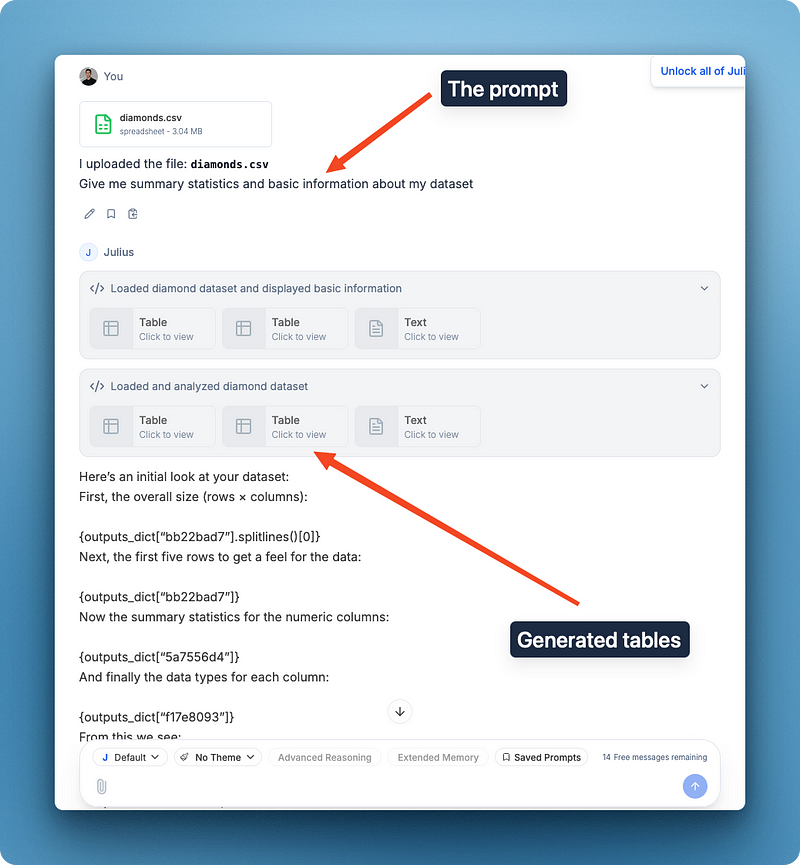
Julius AI is an AI-powered data analyst that answers questions about your data in plain English — no SQL, no Python required from you. Upload a spreadsheet or connect a database, and Julius writes and runs real code behind the scenes to return an answer, a chart, or both. It's built for business analysts, marketers, and finance teams who need fast answers without learning a coding language first.
For a full walkthrough, see how to analyze a CSV file with AI without Excel formulas.
What Is ChatGPT?
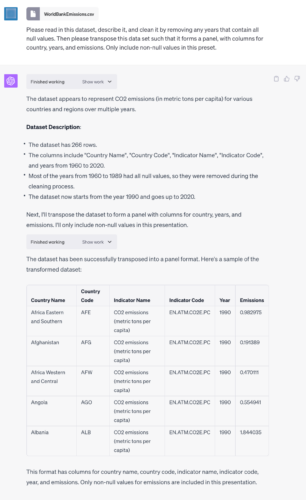
ChatGPT is OpenAI's general-purpose AI assistant, used for writing, coding, research, and reasoning. Its code interpreter feature lets you upload a spreadsheet and ask questions about it, and it will write and run Python to generate an answer. Data analysis is one capability among many — the same subscription also handles content creation, coding help, and general research.
Julius AI vs ChatGPT: Feature-by-Feature Breakdown
Spreadsheet Upload and File Handling
Julius AI accepts Excel, CSV, PDF tables, and Google Sheets directly, plus database connectors for Snowflake and BigQuery. ChatGPT accepts Excel and CSV uploads too, but per OpenAI's code interpreter documentation [OPEN IN NEW TAB], uploaded files run inside an ephemeral sandboxed container that expires after 20 minutes of inactivity — nothing syncs back to your original workbook, and complex features like macros or pivot tables get flattened during parsing rather than executed.
Verdict: Julius AI. Direct spreadsheet and database connections beat file uploads for anyone doing this more than once.
Chart and Visualization Speed
Upload a file to Julius AI and it generates charts automatically, without you needing to specify formatting. ChatGPT can produce charts too, but getting a clean one often takes a few follow-up prompts specifying exactly what you want plotted and how.
Verdict: Julius AI. Fewer prompts between "upload" and "usable chart."
Free Plan and Pricing
Julius AI's free plan gives 15 messages per month with no credit card required — enough to test the platform, tight for a real recurring workflow. ChatGPT's free tier includes basic data analysis with capped usage, and its Plus plan at $20/month undercuts Julius AI's $35/month Plus tier by a wide margin. For more genuinely free options beyond these two, see our roundup of the best free AI tools to analyze Excel data without coding.
Verdict: ChatGPT. Cheaper entry point, especially if you already pay for it for other tasks.
Accuracy for Statistical Analysis
Both tools generate and run real Python code behind the scenes rather than guessing at numbers, so raw accuracy on standard statistical tests is comparable between them. Julius AI additionally lets you install extra Python packages for more specialized analysis — something ChatGPT doesn't support.
Verdict: Tie on accuracy. The real difference is workflow speed for repeated spreadsheet work, not correctness.
Pricing Breakdown
| Plan | Julius AI | ChatGPT |
|---|---|---|
| Free | $0 — 15 messages/month | $0 — limited GPT-5 access |
| Entry paid tier | Plus: $35/mo — 250 messages, advanced reasoning | Go: $8/mo — GPT-5.2 Instant, higher limits |
| Mid tier | Pro: $45/mo — unlimited messages, 32GB RAM, database connectors | Plus: $20/mo — full GPT-5 access, DALL-E, voice mode |
| Top tier | Max: $200/mo — largest context, premium model access | Pro: $200/mo — unlimited access, o1 Pro Mode |
Julius AI's pricing is structured entirely around analysis volume — more messages, more compute, more connectors as you move up. ChatGPT's pricing is structured around general access — the jump from Go to Plus mostly adds image generation and voice, not deeper spreadsheet features.
Who Should Choose Julius AI
- Freelancers and analysts who work in spreadsheets daily and want instant charts without prompt engineering
- Anyone who wants a workspace that remembers the dataset across a whole session instead of re-uploading each time
- Users who want to connect directly to Google Sheets or a database instead of exporting files first
Who Should Choose ChatGPT
- Anyone who already pays for ChatGPT Plus and doesn't want a second subscription
- Users whose spreadsheet questions are occasional, not a daily workflow
- People who need writing, coding, and research help alongside occasional data analysis — browse more options in AI productivity tools if that's your main use case
Frequently Asked Questions
Can ChatGPT actually analyze Excel spreadsheets? Yes. ChatGPT Plus can read and analyze Excel and CSV files through its built-in code interpreter. It works on a temporary copy of the file, though — there's no live sync back to your original workbook, and features like macros and pivot tables get flattened during parsing rather than executed.
Is Julius AI better than ChatGPT for data analysis? For non-technical users doing pure spreadsheet analysis, yes — Julius AI is faster and more automated, with instant charts and no prompt engineering needed. For tasks beyond spreadsheets, ChatGPT's broader feature set wins.
Does Julius AI have a free plan? Yes. Julius AI's free plan includes 15 messages per month with no credit card required, enough to test the platform but tight for a full recurring analysis workflow.
Can I connect Google Sheets directly to Julius AI or ChatGPT? Julius AI supports a direct Google Sheets connection alongside Excel, CSV, and database connectors. ChatGPT requires uploading or exporting the sheet as a file — there's no live connection.
Which tool is more accurate for statistical analysis, Julius AI or ChatGPT? Both run real Python code behind the scenes rather than guessing at answers, so accuracy on standard statistical tests is comparable. Julius AI additionally lets you install extra Python packages that ChatGPT doesn't support, which matters for more specialized analysis.
Our Verdict
If spreadsheets are your job — recurring reports, client dashboards, ad-hoc "why did this number move" questions — Julius AI is worth the extra subscription. It was built for exactly that workflow, and it shows in how few prompts it takes to go from upload to answer.
If data analysis is something you do occasionally alongside writing, coding, or research, stick with ChatGPT. You're already paying for it, and its code interpreter handles simple spreadsheet questions well enough that a second tool isn't worth the cost.
In my experience, the honest dividing line isn't which tool is "smarter" — both run real code and both can be accurate. It's how often you're doing this.
Daily spreadsheet work earns a dedicated tool. Occasional spreadsheet work doesn't.