Keynote vs Google Slides: The Real Lock-In Breakdown

On this page9 sections
- Keynote vs Google Slides: Head-to-Head
- What Is Keynote?
- What Is Google Slides?
- Feature-by-Feature Breakdown
- Platform Support and Ecosystem Lock-In
- Real-Time Collaboration
- Export Fidelity PPTX Round-Trip
- Design and Animation Depth
- Keynote vs Google Slides: Pricing Breakdown
- Who Should Choose Keynote
- Who Should Choose Google Slides
- Frequently Asked Questions
- Keynote vs Google Slides: Our Verdict
Google Slides wins the moment anyone outside the Apple ecosystem needs to open the file — it works on any device with zero setup. Keynote wins on design polish for solo Mac users who never share editing access. Both cap real-time collaboration at 100 people; the real gap is friction, not capacity.
- Keynote and Google Slides both cap real-time collaboration at 100 simultaneous people — the difference is that Keynote needs every collaborator to have an Apple ID
- Keynote for iCloud (icloud.com/keynote) lets Windows and Android users view and lightly edit a shared deck — most comparisons act like this doesn't exist
- PPTX export breaks in both directions, not just Keynote's — fonts, animations, and SmartArt are the usual casualties either way
- Keynote is free with any Apple ID; Google Slides is free for individuals or bundled into Google Workspace Business Standard for teams
- If the real problem is starting from a blank slide rather than picking a platform, Gamma sidesteps this decision entirely
Keynote vs Google Slides isn't really a features fight — both apps make a perfectly good slide. It's an ecosystem question: will this deck, or the people editing it, ever touch a device that isn't Apple's.
Here's the short version: go with Keynote if you're a solo Mac or iPad user who never hands off editing access. Go with Google Slides the moment anyone else — a client, a teammate, a future version of you on a work laptop — needs to open it. This is one piece of a bigger decision; if you're weighing every option beyond just these two, the full PowerPoint alternatives breakdown covers AI deck builders and design-first tools too.
What follows is the actual collaboration cap as a number instead of "less robust," what specifically breaks when a file crosses formats, and current pricing on both sides.
Keynote vs Google Slides: Head-to-Head
| Criteria | Keynote | Google Slides |
|---|---|---|
| Platform support | Mac, iPad, iPhone native; browser via iCloud | Any OS with a browser |
| Real-time collaboration cap | Up to 100 (requires Apple ID) | Up to 100 (link-based, no ecosystem lock-in) |
| Offline editing | Full, native | Chrome extension, limited features |
| PPTX export fidelity | Animations, fonts, transparent backgrounds often break | Font substitution, SmartArt flattening on import/export |
| Design and animation depth | Magic Move, cinematic transitions | Simpler native transitions, AI layout suggestions |
| Price | Free with any Apple ID | Free personal; Workspace Business Standard for teams |
If you're already leaning toward generating a deck from a prompt rather than picking between two traditional editors, a prompt-to-deck tool solves a different problem than either of these.
What Is Keynote?
Keynote is Apple's presentation app, bundled free with every Mac, iPad, and iPhone and synced across all three through iCloud. It's built around design polish — custom transitions, precise typography control, and animation sequences that other tools take longer to set up.
What Is Google Slides?
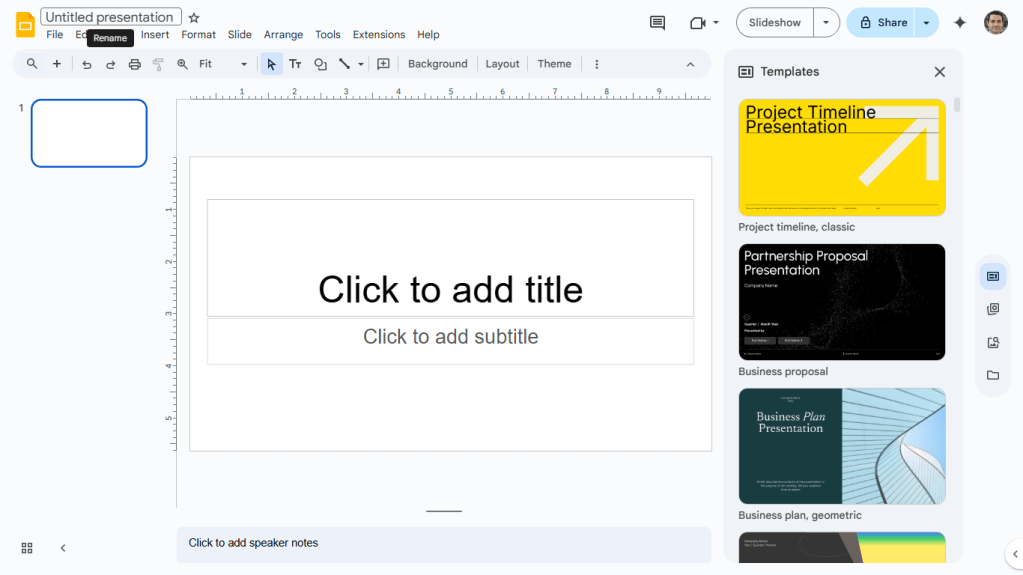
Google Slides is Google's browser-based presentation tool, free for anyone with a Google account and built into Google Workspace for teams. There's no installer and no version conflicts — it opens and syncs the same way on a Chromebook, a Windows laptop, or an iPad.
Feature-by-Feature Breakdown
Platform Support and Ecosystem Lock-In
Keynote's native app only runs on Mac, iPad, and iPhone. What most comparisons skip: Keynote for iCloud (icloud.com/keynote) gives anyone with an Apple ID browser access to view and lightly edit a shared presentation from Windows or Android, though with reduced editing fidelity compared to the native app. Google Slides, by contrast, runs at full functionality on any OS with a browser — Windows, Mac, Linux, Chromebook, Android.
Verdict: Google Slides, unless every current and future collaborator is confirmed Apple-only.
Real-Time Collaboration
Keynote supports up to 100 people viewing or editing a shared presentation at once through iCloud, according to Apple's own collaboration documentation — the same ceiling Google Slides advertises through Google Workspace. The gap isn't capacity, it's setup: Keynote collaborators need an Apple ID and iCloud access before they can join, while Google Slides collaborators just need a link.
Verdict: Technically tied. Google Slides wins on how fast a new collaborator can actually get in.
Export Fidelity (PPTX Round-Trip)
Exporting a Keynote file to PPTX commonly drops animations, substitutes custom fonts, and can turn a transparent background back to solid white. But this isn't a one-sided problem — Google Slides has its own round-trip issues importing or exporting PPTX, with font substitution and SmartArt graphics flattening into static images being the most common failures.
Verdict: Neither tool wins this one. Test the specific slide that matters most before trusting either export.
Design and Animation Depth
Keynote's Magic Move and cinematic transition library are still ahead of what Google Slides offers natively — it's the tool built for presenters who lean on custom motion as part of the pitch. Google Slides has a simpler native transition set, though Google's AI layout suggestions have closed part of that gap for static slide design.
Verdict: Keynote, for anyone who designs a lot of custom animation into their decks.
Keynote vs Google Slides: Pricing Breakdown
| Plan | Keynote | Google Slides |
|---|---|---|
| Free / individual | Free with any Apple ID | Free with any Google account |
| Team tier | No separate team plan — shared via iCloud | Workspace Business Standard, from $14/user/mo |
| AI features | None built in | Gemini included in Business Standard+ |
Keynote has no paid tier at all — it's free the moment you have an Apple ID, whether or not you own Apple hardware, though full editing requires a Mac, iPad, or iPhone. Google Slides is free for individuals and adds Gemini at no extra charge once a team upgrades to Workspace Business Standard.
Who Should Choose Keynote
- Solo Mac or iPad users who present their own decks without handing off editing access
- Presenters who lean on custom transitions and animation as part of the pitch
- Anyone already living inside iCloud for photos, files, and notes
Who Should Choose Google Slides
- Any team with even one non-Apple device in the mix
- Freelancers collaborating with clients who won't have an Apple ID
- Anyone who wants zero-setup link sharing instead of iCloud invites
If your actual bottleneck is design speed rather than platform, Canva Presentations gets Keynote-level polish without the Apple lock-in — our Canva vs PowerPoint breakdown covers that trade-off in more depth. And if the real complaint is collaboration friction at team scale, Pitch is built specifically for that; the Google Slides alternatives roundup narrows down the best non-Microsoft, non-Apple picks. If neither traditional editor fits at all, the full directory of AI presentation tools is a faster way to compare alternatives than reading another vendor blog.
Frequently Asked Questions
Is Keynote better than Google Slides? For solo, Mac-only design work, yes — Keynote's animation and typography tools are ahead. For anything involving a Windows user or real-time cross-platform collaboration, Google Slides wins on setup friction alone.
Can I use Keynote on Windows? Not the native app, but Keynote for iCloud (icloud.com/keynote) lets anyone with an Apple ID view and lightly edit a shared presentation from a browser on any operating system.
Does Keynote convert cleanly to PowerPoint? No — animations, custom fonts, and transparent backgrounds are the most common casualties on export, and the same kind of formatting loss happens in the other direction too.
How many people can collaborate on a Keynote presentation at once? Up to 100, matching Google Slides' real-time collaboration ceiling — the difference is that every Keynote collaborator needs an Apple ID first.
Keynote vs Google Slides: Our Verdict
Default to Google Slides unless the deck and every person who will ever open it are confirmed Apple-only. The collaboration cap is identical either way, so the entire decision comes down to who else has to access the file — today or six months from now.
If what's actually broken for you isn't the platform but the fact that you're starting from a blank slide, neither tool fixes that. That's a prompt-to-deck problem, and it's exactly what the wider PowerPoint alternatives guide is built to help with.