Recruit CRM Free Trial Review 2026: Is It Actually Useful?

- Free trial expires: Never — no time limit, no credit card required
- AI candidate matches on trial: 2 per job (Business plan gets 50)
- Best for: Staffing and recruitment agencies evaluating workflow fit
- Not for: In-house HR teams; recruiters needing Naukri.com integration
- Verdict: Good enough to evaluate properly — but know the limits before you sign up
- Recruit CRM's "unlimited" free trial runs on Pro-tier limits, not a full feature unlock.
- The 2 AI candidate matches per job is the most important cap to understand — it's a real constraint for active recruiting, but enough to test quality.
- Upgrading to Business (₹4,999/user/month) unlocks 50 matches, unlimited email sequences, and multiple hiring pipelines.
- Founded in India, the platform offers INR billing and GST invoices. UPI and Razorpay support is unconfirmed — verify at checkout before upgrading.
Recruit CRM Free Trial Review 2026: Is It Actually Useful?
Recruit CRM markets its free tier as an "unlimited free trial" — and technically that's accurate. There's no expiration date — unlike Workable's 15-day trial for AI resume screening or Skima's 14-day window. You can use the platform for as long as you want without paying or entering a credit card.
But unlimited time is not the same as unlimited features. The trial runs on Pro-plan restrictions, and the most meaningful one is the AI candidate matching limit: 2 matches per job opening. That single number determines whether this trial is genuinely useful for your workflow — or whether you'll need to decide on an upgrade before you can really stress-test the platform.
This review breaks down exactly what the free trial gives you, what it withholds, and who should sign up versus who should skip straight to a paid plan. If you're comparing options before committing, our guide to free AI recruiting tools for Indian startups covers where Recruit CRM fits alongside the rest of the free stack.
What Is Recruit CRM?
Recruit CRM is an AI-first ATS and CRM built for recruitment and staffing agencies. Unlike most HR tools that focus on one or the other, it combines candidate tracking, client relationship management, deal pipelines, and invoicing in a single platform. Founded in India in 2017, it now serves agencies in 100+ countries and holds a 4.9/5 rating on Capterra from over 445 verified reviews — the highest in the recruitment CRM category.
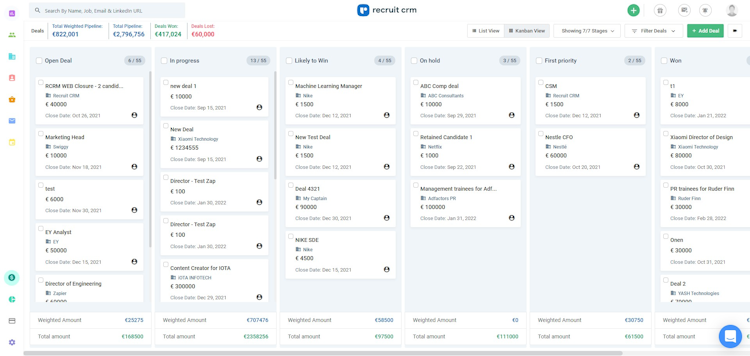
The critical framing: this tool is designed for agencies that manage both candidates and clients. If you're in-house HR at a company hiring for internal roles, much of the feature set won't apply to you.
What the Free Trial Actually Gives You
The free trial is, essentially, the Pro plan without a payment date. Here's what that means in practice.
What's included:
- Unlimited candidates and jobs in the system (you can add as many records as you want)
- Core ATS + CRM tracking — pipeline views, candidate profiles, client records
- Chrome sourcing extension for LinkedIn
- AI resume parsing (reads and structures candidate profiles automatically)
- Basic email templates
- 1 hiring pipeline
- Up to 15 custom fields
What's not included:
- AI candidate matching beyond 2 per job
- More than 1 email sequence
- Multiple hiring pipelines
- LogicMelon job posting integration
- API access
- Branding removal (Recruit CRM branding stays visible to candidates)
- Bulk texting
- Custom roles and team permissions
- Executive search report generator
The phrase "unlimited candidates" can mislead people into thinking the trial gives you full access. It doesn't. You can store unlimited records — but the AI features applied to those records are capped at Pro-tier limits.
| Feature | Free Trial (Pro) | Business Plan |
|---|---|---|
| Time limit | None | N/A (paid) |
| AI candidate matches | 2 per job | 50 per job |
| Email sequences | 1 | Unlimited |
| Hiring pipelines | 1 | Multiple |
| Custom fields | 15 max | 150 max |
| Bulk texting | No | Yes |
| Resume formatting | No | Yes |
| Custom roles | No | Yes |
| Branding removal | No | Yes |
| LogicMelon job posting | No | Yes |
| API access | No | Yes |
The 2 Candidate Matches — What It Actually Means
This is the feature most reviewers mention and fewest actually explain. Here's how it works.
When you open a job in Recruit CRM, the platform's AI scans your existing candidate database and surfaces the profiles most likely to match that role. On the free trial and Pro plan, you get 2 suggested matches per job. On the Business plan, you get 50.
The practical reality for evaluation:
If you're signing up to test whether the AI matching quality is good enough to justify paying, 2 matches per job is sufficient. You'll get a clear enough signal in the first week: does the AI surface genuinely relevant candidates, or is it returning noise? Two matches is enough to test that question.
The practical reality for active recruiting:
If you're trying to run real, active recruiting on the free trial — not just evaluate — the 2-match limit is a genuine constraint for anyone working 5 or more open roles simultaneously. You'll hit the ceiling quickly and know you need to decide on an upgrade.
One scenario where the limit barely matters:
If your primary sourcing workflow uses the Chrome extension to pull candidates directly from LinkedIn — not from your internal database — the candidate matching feature is secondary. Many solo recruiters operate this way in the early stages. For them, the trial is fully functional for daily work.
To see how other tools handle AI matching and screening on their free tiers, our comparison of what free AI resume screening plans actually allow covers the full field. You can also browse the AI resume tools category on YourAiFinder for standalone screening alternatives.
Who Should (and Shouldn't) Use This Free Trial
Sign up if you are:
- A staffing agency or solo recruiter wanting to evaluate whether Recruit CRM's combined ATS + CRM workflow fits how you manage candidates and clients
- A recruiter who sources primarily from LinkedIn via Chrome extension (the matching limit won't bottleneck you)
- An agency looking for a platform that includes invoicing, deal pipelines, and placement tracking in one place without paying enterprise prices
- An Indian agency that wants INR billing and GST invoices on your recruitment software
Look elsewhere if you are:
- An in-house HR team hiring for internal roles — the client management, deal pipelines, and invoicing features won't apply to you. Manatal is a better fit for in-house teams.
- A recruiter who needs Naukri.com job posting integration — Recruit CRM doesn't have this natively. Zoho Recruit Standard supports it. Our Zoho Recruit free plan review India 2026 covers exactly what the free tier gives you versus the Standard plan with Naukri integration.
- A team that needs AI matching at scale from day one — if you're already managing a large candidate database and need 50 matches per job to function efficiently, start with Business rather than testing limits on the free tier.
- Anyone who needs WhatsApp-based candidate screening built in — this requires an add-on purchase and is not part of the standard plan.
Recruit CRM Pricing in India (INR)
Recruit CRM was founded in India and has maintained INR billing for Indian users. GST invoices are available for registered businesses, and the platform saves up to 18% on purchases made with a GST invoice.
| Plan | INR/user/month | USD equivalent | Key AI limit |
|---|---|---|---|
| Pro (Free Trial → Paid) | ₹3,199 | ~$95 | 2 AI candidate matches |
| Business | ₹4,999 | ~$125 | 50 AI candidate matches |
| Enterprise | ₹10,000 | ~$165 | Full automation + LinkedIn messaging |
Annual billing saves up to 20% across all plans. GST invoice is available on request. See current INR rates on Recruit CRM's pricing page.
Payment methods: International credit/debit cards are confirmed. UPI and Razorpay support is unconfirmed — check at checkout on recruitcrm.io/pricing before committing to a paid plan.
Support: Recruit CRM claims 24/7 live chat with under 2-minute response times. The engineering and support team is India-based. No VPN is required to access the platform from India.
What's missing for Indian recruiters: No Naukri.com native integration at any plan tier. If posting to Naukri is part of your recruiting workflow, you'll need to use Zapier as a workaround or switch to Zoho Recruit Standard, which has Naukri built in.
Frequently Asked Questions
Does Recruit CRM's free trial ever expire?
No. The free trial has no time limit, and no credit card is required. You can use the platform on Pro-tier features indefinitely. When you decide to upgrade, Business starts at ₹4,999/user/month and unlocks 50 AI candidate matches, unlimited email sequences, and multiple hiring pipelines.
What is the difference between the free trial and the paid Pro plan?
They're the same feature tier. The free trial runs on Pro-plan limits. When you pay for Pro (₹3,199/user/month), you're paying to keep your data in a committed account, not to unlock more features. To get meaningfully more capability — specifically 50 candidate matches and unlimited sequencing — you need to step up to Business.
Does Recruit CRM integrate with Naukri.com?
No. Recruit CRM does not have a native Naukri.com integration on any plan tier, including Enterprise. If Naukri posting is essential to your Indian recruiting workflow, Zoho Recruit Standard includes a built-in Naukri integration. For Recruit CRM users who need Naukri, a Zapier workaround is possible but adds setup overhead.
Is Recruit CRM better than Manatal for Indian staffing agencies?
For staffing agencies, yes. Recruit CRM's combined ATS + CRM + invoicing workflow is built specifically for agencies managing client relationships. Manatal is a better fit for in-house HR teams or solo recruiters focused purely on hiring without client management needs.
If you're running a recruitment business (not just hiring for one company), Recruit CRM has the more relevant feature set. For AI interview notes and candidate intelligence alongside either platform, Metaview is worth pairing in.
Our Verdict
Recruit CRM's free trial is one of the more genuinely useful "unlimited" offers in recruitment software — precisely because the limits are clear enough that you'll know within two to three weeks whether the platform is right for you.
The 2 AI candidate match ceiling isn't a dealbreaker for evaluation; it's a forcing function. You'll test the quality of the matching, feel the workflow, and either confirm you need the 50-match Business plan or realize the platform doesn't fit how you recruit.
My recommendation: sign up specifically to test the Chrome LinkedIn sourcing and pipeline management. Those are Recruit CRM's strongest features, and they work fully on the free trial. The AI matching is a bonus you'll assess as your candidate database grows.
If you're a staffing or recruitment agency — especially a small Indian firm with an eye on INR billing and GST invoices — this is worth spending a week with before paying for anything.