
Beautiful.ai Reviews 2026: Worth It Without a Free Plan?

On this page7 sections
- Beautiful.ai Pricing — No Free Plan, Just a Trial
- Beautiful.ai Reviews: Why the Ratings Split 2.8/5 vs. 4.2/5+
- What Beautiful.ai Actually Does — Smart Slides and Create with AI
- Who Beautiful.ai Is Actually For
- Beautiful.ai Alternatives Worth Knowing
- Frequently Asked Questions
- Final Verdict — Our Beautiful.ai Review Summed Up
Beautiful.ai is worth it if you're a team that needs every deck to stay on-brand with minimal effort — not if you're a solo user who presents occasionally, because there's no free plan, only a 14-day trial that auto-charges your card. Pricing starts at $14.50/mo (annual) for individuals. Ratings split hard by platform: 2.8/5 on Trustpilot, 4.2/5+ on Capterra and G2.
- Beautiful.ai has never had a persistent free plan — only a 14-day trial
- The trial requires a credit card upfront and auto-charges unless you cancel first
- Trustpilot's 2.8/5 rating is driven almost entirely by billing and cancellation complaints, not the product itself
- Capterra (4.2/5) and G2 reviewers consistently praise Smart Slides and how fast on-brand decks come together
- Best fit: teams enforcing brand consistency across many contributors. Weakest fit: a one-off solo deck
Look up beautiful ai reviews and you'll find two completely different pictures of the same product. On Capterra and G2, it's a 4-plus-star favorite people credit with cutting deck-building time from a day and a half down to a few hours. On Trustpilot, it's sitting at 2.8 out of 5.
Same tool, wildly different verdicts — and the reason isn't the software.
Here's the short version: Beautiful.ai has never offered a free plan. What it offers is a 14-day trial that needs your credit card before you start, and that card gets charged automatically the moment the trial ends unless you cancel first. That single fact explains most of the rating gap, and it's the thing this review leads with instead of burying it in paragraph twelve.
Below: what the product actually does well, what real pricing looks like, why the reviews split so sharply by platform, and a narrow verdict on who should actually start that trial. If you'd rather see how it stacks up against the rest of the field first, our ranked roundup of the best PowerPoint alternatives covers seven options side by side, or browse the full AI presentation tools category on YourAiFinder.
Beautiful.ai Pricing — No Free Plan, Just a Trial
Beautiful.ai sells three tiers, and none of them is free.
| Plan | Price (annual) | Price (monthly) | Who it's for |
|---|---|---|---|
| Pro (Individual) | $14.50/mo | $45/mo | Solo users, freelancers |
| Team (2-20 users) | $40/user/mo | $50/user/mo | Small-to-mid teams |
| Enterprise | Custom | Custom | Large organizations |
The only way to try Beautiful.ai without paying immediately is the 14-day free trial — and even that requires a credit card at signup. Per Beautiful.ai's own pricing page, "your credit card on file will be charged automatically unless you cancel your Pro subscription before the 14 days are up." There's no way around entering payment details first, and no separate free tier to fall back on afterward.
Beautiful.ai Reviews: Why the Ratings Split 2.8/5 vs. 4.2/5+
This is the part most beautiful ai reviews skip.
On Trustpilot, Beautiful.ai holds a 2.8 out of 5 across 246 reviews. Read through them and the pattern is consistent: customers charged for an annual plan when they thought they'd picked monthly, a cancellation process that's harder than it should be, and slow support responses when someone's trying to dispute a charge. One recurring complaint describes waiting more than 48 hours for any reply to a billing email.
On Capterra, the picture flips — 4.2 out of 5 across 86 verified reviews. The praise here is about the product itself: one reviewer describes building 30-40 slides in a few hours, work that used to take a day and a half in another tool. Others highlight the professional-looking templates and how easy it is to keep decks organized in folders while collaborating with a team.
G2 shows a similar pattern, with reviewers rating the product itself highly and rarely mentioning billing at all.
The honest read: the software earns its praise. The sign-up-to-paid conversion process is where trust breaks down. If you go in knowing that upfront and set a cancellation reminder, you avoid the exact problem driving Beautiful.ai's worst reviews.
What Beautiful.ai Actually Does — Smart Slides and Create with AI
Smart Slides are Beautiful.ai's core feature — over 300 auto-aligning layouts that adjust spacing, alignment, and hierarchy in real time as you add content, so a slide with three bullet points and a chart still looks deliberately designed rather than dumped onto a template.
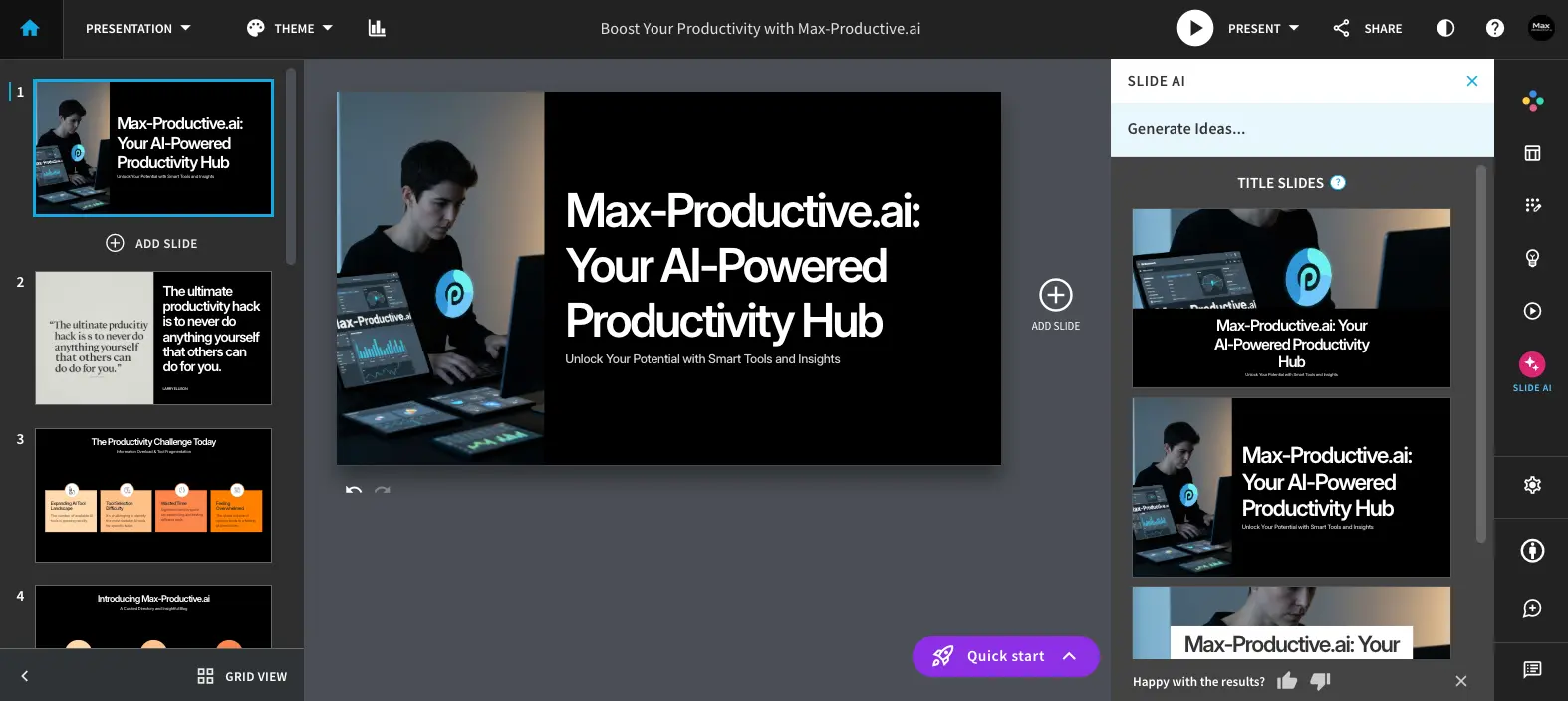
Create with AI is the current name for Beautiful.ai's generation workflow (older reviews still call this "Designer Bot," which is outdated as of this review). You give it a prompt or an outline, shape the slide-by-slide structure first, and it generates a full deck using Smart Slide layouts rather than one static template repeated on every page.
Beyond those two, the rest of the feature set is built for teams:
- Locked brand themes — colors, fonts, and logo defined once and applied automatically across every deck
- Shared slide libraries and template libraries across a workspace
- Real-time collaborative editing with user permissions
- Data-linked charts and graphs that update when the connected spreadsheet changes
- Export to PDF and PPT — though several reviewers report formatting inconsistencies after export, with text and elements converting to shapes that need manual cleanup
Who Beautiful.ai Is Actually For
Good fit:
- Teams producing many decks that all need to look identical, regardless of who built them
- Sales or marketing teams that need a locked brand kit enforced without policing every contributor
- Anyone who values speed over pixel-level manual control
Not a good fit:
- Solo users who present occasionally — with no free plan, that's a real ongoing cost for infrequent use
- Anyone who needs precise, custom layouts — Smart Slides constrains design flexibility by design
- Anyone who might forget to cancel before day 14
Beautiful.ai Alternatives Worth Knowing
If the no-free-plan model is a dealbreaker, three alternatives are worth a look before you start the trial:
- Canva Presentations — has an actual usable free plan, for readers who don't want to hand over card details just to test a tool.
- Gamma — generates AI decks from a prompt and includes a real free credit allowance rather than a time-limited trial.
- Pitch — built for team collaboration on decks without Beautiful.ai's trial-billing friction.
For a deeper look at Canva specifically — including where its free tier stops — see our full Canva vs PowerPoint comparison. The full lineup — organized by what you're actually trying to do — lives in our complete PowerPoint alternatives guide.
Frequently Asked Questions
Does Beautiful.ai have a free plan?
No. Beautiful.ai has never offered a persistent free plan — only a 14-day free trial that requires a credit card and auto-renews into a paid subscription if you don't cancel first.
How much does Beautiful.ai cost?
Pro (individual) is $14.50/month billed annually, or $45/month billed monthly. Team (2-20 users) is $40/user/month annually, or $50/user/month monthly. Enterprise pricing is custom.
Is Beautiful.ai worth it for a single freelancer?
Usually not as a first choice. Without a persistent free tier, occasional solo use is better served by Canva Presentations or Google Slides — see our Google Slides vs PowerPoint comparison for the free-vs-paid tradeoffs. Beautiful.ai earns its price when a team needs enforced brand consistency across many decks.
Can you cancel a Beautiful.ai trial before being charged?
Yes, but reviewers describe the cancellation flow as requiring a mandatory form rather than a single click, so it's safer to cancel a few days before the 14-day deadline rather than on the last day.
Is Beautiful.ai good for PowerPoint export?
It exports to PPT and PDF, but multiple reviewers report formatting inconsistencies after export — text and elements sometimes convert to shapes that need manual cleanup in PowerPoint.
Final Verdict — Our Beautiful.ai Review Summed Up
Beautiful.ai is worth the trial if you're evaluating it for a team that needs brand-consistent decks built fast, and only if you set a cancellation reminder for day 12 or 13 rather than trusting yourself to remember day 14. The Smart Slides engine genuinely earns the praise it gets on Capterra and G2.
But going in blind to the billing mechanics is exactly how you end up in the 2.8-star Trustpilot crowd instead of the happy one. Know that going in, and this becomes a much easier decision.